Which iPhone Screen Protector Is Best for Daily Use?
If you want solid iphone display protection, start with the type of screen protector that matches how you actually use your phone. Tempered glass is the safest default for most people, while privacy, matte, and plastic film protectors make sense in more specific situations. The main thing is not buying the "strongest" option on the box, but choosing one that fits your iPhone model, your case, and your daily habits.
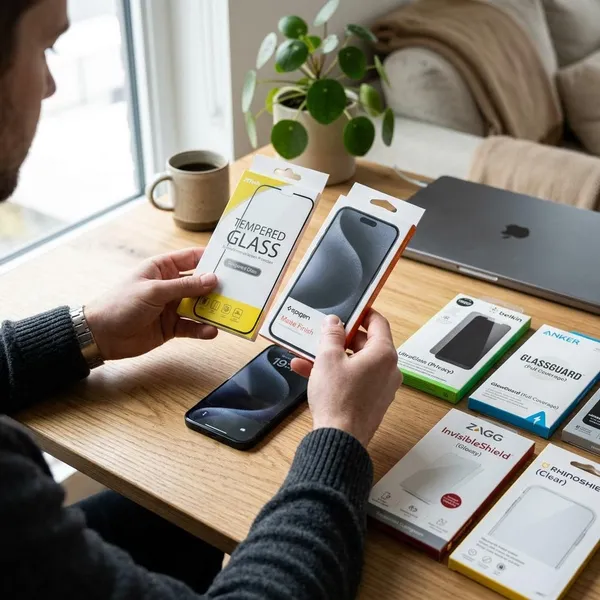
Best iPhone screen protector types
The best iPhone screen protector type depends on what you need most: impact protection, privacy, glare control, or simple scratch coverage. For everyday use, tempered glass is usually the easiest recommendation because it feels close to the original display and gives better impact protection than thin film.
| Protector type | Best for | Main trade-off |
|---|---|---|
| Tempered glass | Daily protection, drops, smooth touch | Slightly thicker than film |
| Privacy glass | Commuting, work travel, public spaces | Can reduce brightness from angles |
| Matte protector | Outdoor use, glare-heavy rooms, fewer fingerprints | Can soften display sharpness |
| Plastic film | Basic scratch protection or temporary use | Weak impact protection |
Tempered glass for everyday protection
Tempered glass is the best choice for most iPhone users because it gives a useful balance of durability, clarity, and touch feel. It is especially worth choosing if your phone goes in bags, pockets, car mounts, desks, or anywhere it might meet keys, coins, or a hard edge.
Privacy glass for screen privacy
Privacy glass is useful if you often use your iPhone on trains, buses, planes, in cafés, or in shared offices. It narrows the viewing angle so the screen looks clear from straight on but much darker from the side.
Matte protectors for reduced glare
A matte protector makes sense when reflections bother you more than maximum screen sharpness. It can help if you read outside, use your phone near bright windows, or work under strong overhead lighting.
The finish can also feel less slippery and show fingerprints less obviously. The downside is that text, photos, and video may look a little softer than they do through clear glass, so it is better for readability than for people who want the cleanest possible display image.
Plastic film for basic scratch protection
Plastic film is the budget option for light scratch protection. It can be fine for an older backup iPhone, a short-term setup, or someone who is careful with drops and only wants to prevent pocket scuffs.
For long-term use on a main phone, it is usually less satisfying. It does not absorb impact like tempered glass, marks more easily, and often feels less smooth under your finger.
How to choose an iPhone screen protector
Choose in this order: exact model fit first, case compatibility second, then protector type and finish. A premium protector that is slightly wrong for your iPhone or case can lift, collect dust, or feel annoying within days.
- Daily phone, normal risk: choose clear tempered glass with a good installation tray.
- Public transport or work travel: consider privacy glass, but expect some brightness loss.
- Outdoor reading or glare problems: matte may be more comfortable than glossy glass.
- Temporary or older phone: plastic film can be enough if scratches are the only concern.
Match your exact iPhone model
Buy a protector made for your exact iPhone model, not just one that looks similar. Small differences in size, speaker position, camera area, Dynamic Island shape, or edge curve can lead to poor alignment or lifting.
Check case compatibility
Your case can ruin a good screen protector if the edges press against it. Rugged cases with a raised lip often need a case-friendly protector with a little extra space around the border.
If you already use a tight case, avoid full-edge protectors unless the brand clearly says they work together. A slightly smaller protector that stays flat is better than a larger one that peels after a week.
Choose the right edge coverage
Full-coverage protectors look cleaner because they sit closer to the display border, but they are not always the most practical choice. They work best with slim or well-spaced cases.
For bulky cases, choose a protector with modest edge clearance. The small visible gap may not look perfect, but it lowers the risk of pressure bubbles and corner lifting.
Look for good clarity and touch response
A screen protector should not make the iPhone feel cheaper to use. Look for clear glass, smooth touch response, and an oleophobic coating that helps fingerprints wipe away more easily.
If you play games, type quickly, or use edge gestures a lot, poor touch response will bother you more than a tiny difference in price. This is one reason very cheap protectors can feel like a bad deal even when they technically fit.
Consider an installation tray
An installation tray is worth having, especially if you have not applied many protectors before. It reduces crooked placement and helps you lower the glass before dust has time to settle.
- Worth paying for: tray, dust stickers, microfiber cloth, and clear instructions.
- Less important: fancy packaging or vague claims about extreme hardness.
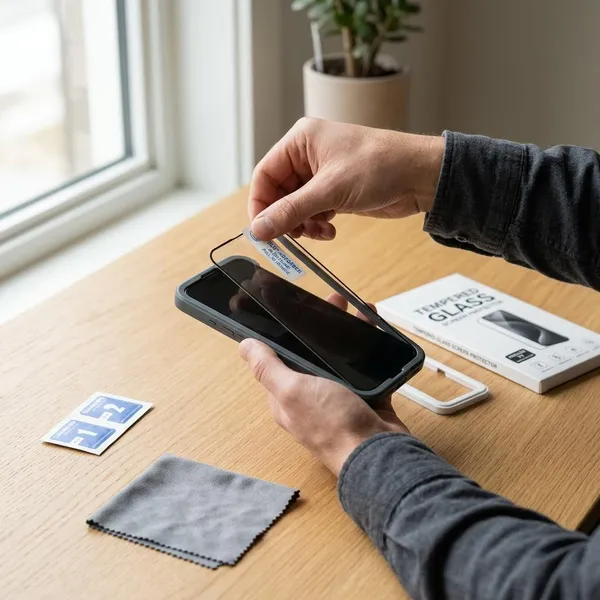
How to install an iPhone screen protector
A clean installation is mostly about patience. The mistakes that cause bubbles, dust spots, and crooked edges usually happen before the protector even touches the display.
- Work in a clean, low-dust space.
- Wash and dry your hands.
- Clean the display until no oil or lint is visible.
- Use dust stickers right before application.
- Align the protector before lowering it.
- Push small bubbles outward gently.
Clean the screen thoroughly
Clean the display until fingerprints, oil, and streaks are gone. Use the included alcohol wipe if there is one, then dry the screen with a microfiber cloth.
Remove every dust particle
Dust is the main reason a protector looks bad after installation. Even one tiny speck can create a bubble that will not press out.
Use the dust-removal sticker just before applying the protector, not five minutes earlier. Avoid touching the screen with your fingers after this step, or you may add oil back onto the glass.
Align the protector
Line up the speaker area, front camera section, Dynamic Island or notch area, and side borders before the adhesive touches the screen. If your kit includes a tray, use it instead of trying to judge the spacing by eye.
Apply it slowly
Lower the protector gradually and let the adhesive spread naturally. Dropping it too quickly can trap air or lock in a crooked position before you have time to react.
If you are applying it manually, start from the top alignment points and keep the side gaps even. A slow placement usually gives a cleaner result than trying to fix a rushed one.
Remove remaining bubbles
Small air bubbles can usually be pushed toward the edge with a microfiber cloth or a soft card wrapped in cloth. Use light pressure rather than forcing the glass down.
If a bubble stays in one exact spot, dust is probably trapped underneath. Lift only the nearest corner, remove the particle with a sticker, and lower the protector again; peeling the whole protector off makes new dust more likely.
When should you replace your screen protector?
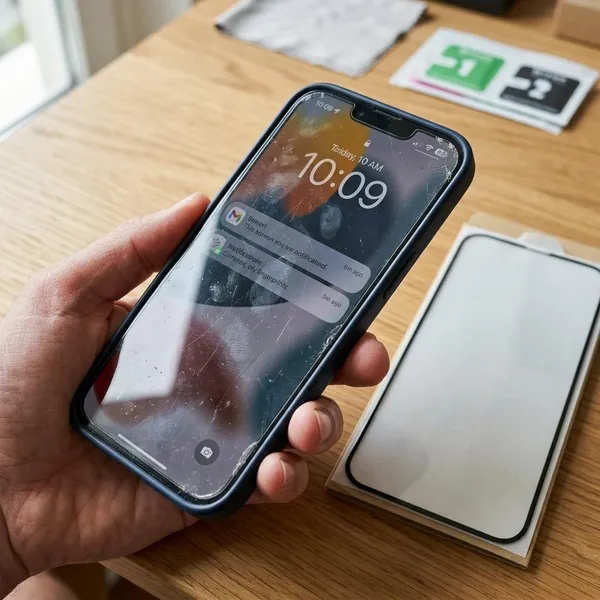
Replace a screen protector when it stops protecting well or starts making the phone worse to use. You do not need to change it for one tiny cosmetic mark, but cracks, lifting edges, deep scratches, poor touch response, and worn coating are all practical warning signs.
For a main phone used every day, it is better to replace a damaged protector early. For an older spare phone, you might tolerate light wear for longer as long as the protector still sits flat and the screen remains easy to use.
Cracks or chips appear
Replace cracked or chipped glass promptly. Once the protector is damaged, it is already weaker and may not handle the next impact well.
A chip near the edge is especially worth taking seriously because it can spread, catch on fabric, or feel sharp under your finger.
Edges start lifting
Lifting edges usually mean the protector is near the end of its useful life. Dust and lint can get underneath, which makes the lifting worse and can leave the screen looking dirty around the border.
Scratches affect visibility
Light surface marks are normal, but replace the protector when scratches make text, photos, or video harder to see. This is most noticeable in sunlight, on white pages, or when watching darker content.
Touch response gets worse
If typing, swiping, or edge gestures start feeling unreliable, check the protector before assuming something is wrong with the iPhone. A shifted, worn, or poorly bonded protector can make touch response feel inconsistent.
This matters most for people who type a lot, play games, or use the phone for work. If a fresh protector fixes the issue, the old one was no longer helping.
The surface coating wears down
Many protectors have a coating that helps reduce fingerprints and keeps swipes feeling smooth. When that coating wears down, the screen may smear quickly and feel draggy even after cleaning.
If wiping the surface no longer helps and the display feels unpleasant every day, replacement is reasonable even if the glass is not cracked.
Conclusion
For most people, clear tempered glass is the best first choice because it protects well without making the iPhone feel awkward to use. Choose privacy glass only when side-angle viewing is a real concern, matte when glare bothers you often, and plastic film when you only need cheap scratch coverage. A protector that fits your exact model, works with your case, and is installed cleanly will do more for daily protection than a product with big claims but poor fit.
FAQS
Does Apple recommend screen protectors for iPhone?
Apple does not require a screen protector for normal iPhone use, but using one is a sensible extra layer if you want to reduce scratches and everyday wear. It is still important to use a compatible protector that does not cover sensors or fit poorly around the top of the display.
Is tempered glass better than plastic film for iPhone?
Yes, tempered glass is better for most people because it feels smoother and offers more useful impact protection. Plastic film is mainly worth choosing for a low-cost spare phone or very basic scratch prevention.
Does a screen protector affect Face ID or touch sensitivity?
A well-fitted protector should not noticeably affect Face ID or touch sensitivity. Problems are more likely when the protector is the wrong size, installed with dust underneath, lifting at the edges, or covering areas it should not cover.
How long does an iPhone screen protector last?
It can last several months to more than a year depending on quality and daily use. Replace it sooner if it cracks, lifts, scratches badly, feels rough, or starts making touch input less reliable.